Plugin für Premiere Pro · Seedance 2.5 · eigener Schlüssel
Clips mit Seedance bearbeiten.Direkt in Premiere Pro.
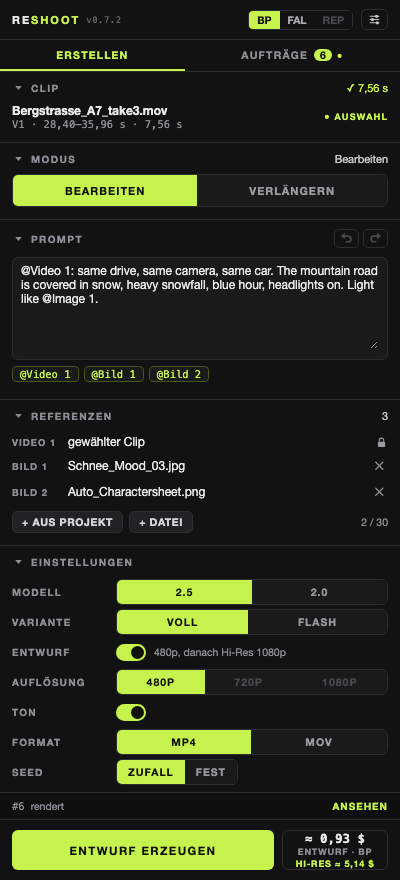
Clip in der Timeline wählen, beschreiben, was sich ändern soll – Wetter, Umgebung, Licht –, und Seedance erzeugt die Variante. Bewegung und Kamera bleiben. Ein Klick legt das Ergebnis eine Spur über das Original.
Läuft mit deinem eigenen Schlüssel – einer genügt
BytePlus ModelArk
Seedance 2.5 · 2.5 Flash · 2.0
fal.ai
Seedance 2.5 · 2.0
Replicate
Seedance 2.5 · 2.0
Kostenlos · Premiere Pro ab 25.6 · macOS · Version 0.7.2
- Bearbeiten – Wetter, Umgebung, Licht ändern; Bewegung und Kamera bleiben
- Verlängern – ab dem letzten Bild weiter, auch rückwärts
- Entwurf → Hi-Res – erst 480p ansehen, dann 1080p
- Kein Konto, kein Abo – abgerechnet wird direkt beim Anbieter, ohne Aufschlag
Installieren
- Reshoot-0.7.2.ccx laden und doppelklicken.
- Creative Cloud warnt, dass das Plugin nicht aus dem Marketplace kommt → Installieren.
- In Premiere: Fenster → UXP-Plugins → Reshoot.
- Regler-Symbol → Schlüssel eintragen → Schlüssel speichern.
Plugin for Premiere Pro · Seedance 2.5 · bring your own key
Edit clips with Seedance.Right inside Premiere Pro.
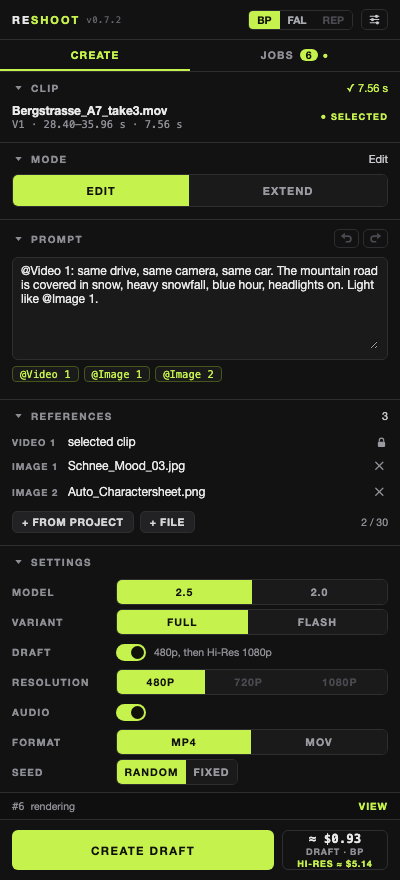
Select a clip in the timeline, describe what should change – weather, setting, light – and Seedance renders the variant. Motion and camera stay. One click puts the result on the track above the original.
Works with your own key – one is enough
BytePlus ModelArk
Seedance 2.5 · 2.5 Flash · 2.0
fal.ai
Seedance 2.5 · 2.0
Replicate
Seedance 2.5 · 2.0
Free · Premiere Pro 25.6+ · macOS · version 0.7.2
- Edit – change weather, setting, light; motion and camera stay
- Extend – continue from the last frame, backward too
- Draft → Hi-Res – check 480p first, then 1080p
- No account, no subscription – billed directly by the provider, no markup
Install
- Download Reshoot-0.7.2.ccx and double-click it.
- Creative Cloud warns that it isn’t from the Marketplace → Install.
- In Premiere: Window → UXP Plugins → Reshoot.
- Slider icon → enter your key → Save keys.